Introduction
REST API (Representational State Transfer Application Programming Interface) is a standardized way for software applications to communicate over the internet. Think of it as a set of rules that allows different programs to talk to each other, similar to how people use a common language to exchange information.
Overview
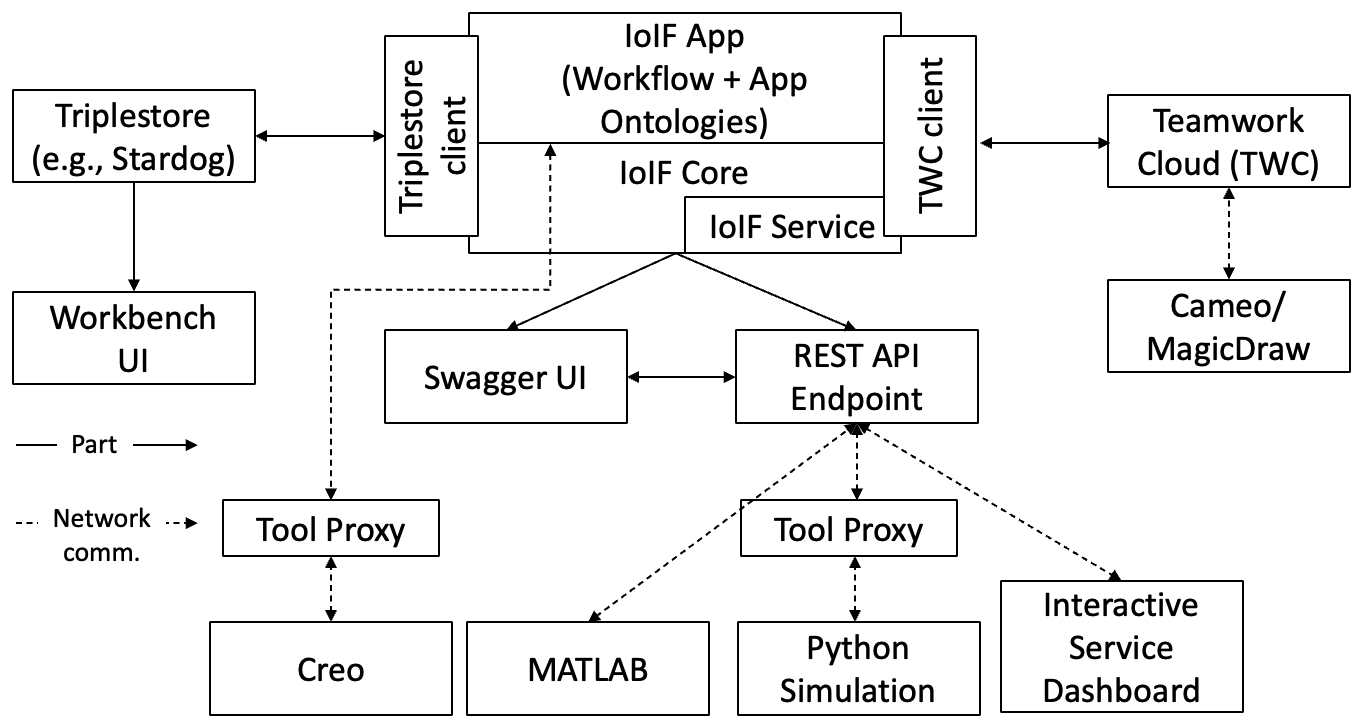
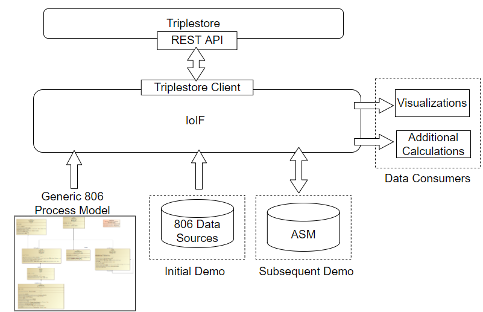
In the context of Digital Engineering (DE) and the Armaments Interoperability and Integration Framework (IoIF), REST API serves as a critical interface for data exchange between tools and systems. REST APIs enable different engineering tools (like MATLAB, Creo, and Jupyter Notebooks) to request and send data to the IoIF framework using standard HTTP methods.
REST API is particularly valuable in IoIF workflows because it: - Provides a consistent interface for data exchange across diverse engineering tools - Enables service-based data exchange (vs. file-based exchanges) - Supports both synchronous and asynchronous communication patterns - Integrates with the IoIF Service for distributed workflow execution
| REST API is a key component of the "Specified Model Interface" in the IoIF framework, which allows external tools to access ontology-aligned data without needing to understand the underlying ontologies. |
Position in Knowledge Hierarchy
Broader concepts: - Workflow (is-a)
Details
REST API follows a client-server architecture where clients (e.g., engineering tools) send requests to servers (e.g., IoIF Service) using standard HTTP methods. The key components include:
HTTP Method |
Description |
GET |
Retrieves data from the server (e.g., fetching model parameters) |
POST |
Sends data to the server to create new resources |
PUT |
Updates existing resources on the server |
DELETE |
Removes resources from the server |
REST API uses standard HTTP status codes to indicate the success or failure of requests: - 200 OK: Request succeeded - 201 Created: Resource was created - 400 Bad Request: Invalid request - 404 Not Found: Resource not found - 500 Internal Server Error: Server-side error
The IoIF Service implements a REST API with routes following the pattern <service URL>:<port>/v1/ui, where:
- service URL is the domain or IP address of the server
- port is the network port the service is listening on
- v1/ui is the API version and endpoint path
| IoIF’s REST API uses JSON as the primary data format for requests and responses, which aligns with the standard output structure described in Figure 121 of the context. |
Practical applications and examples
Using REST API with IoIF
This section provides step-by-step instructions for using REST API with IoIF to exchange data between engineering tools and the IoIF Service.
Step 1: Configure IoIF Service
First, ensure the IoIF Service is running and configured properly. The service can be started using the following command:
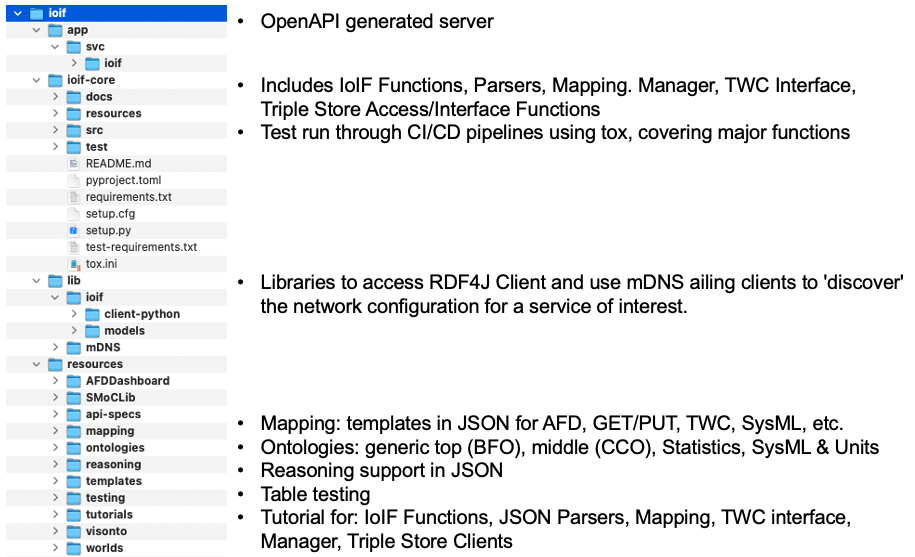
python -m ioif.app.srv.ioifThis command starts the IoIF Service on the default port (3000), making it accessible at http://localhost:3000/v1/ui.
For production environments, you should configure the service to use a specific port and host address. The configuration can be set in the ioif.cfg file.
|
Step 2: Retrieve Data from IoIF
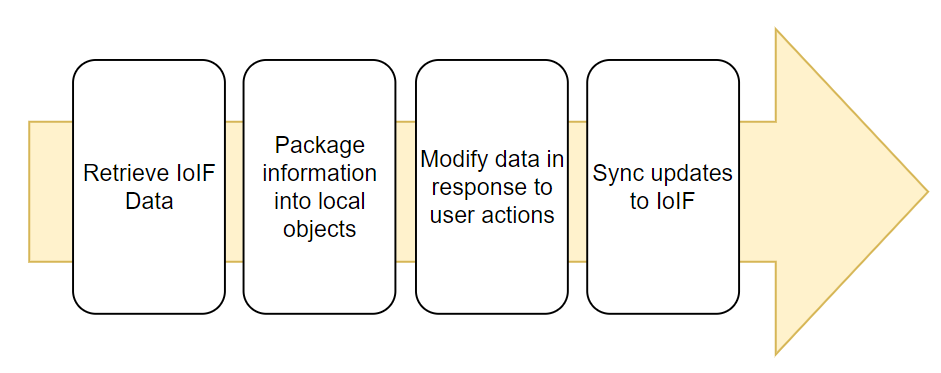
To retrieve data from IoIF using a REST GET request, use the following Python code with the requests library:
import requests

= Configuration
service_url = "http://localhost:3000"
endpoint = "/v1/ui/data"
params = {
    "repository": "catapult",
    "analysis_instance": "baseline",
    "interface": "geometry"
}

= Make the GET request
response = requests.get(
    f"{service_url}{endpoint}",
    params=params
)

= Check response status
if response.status_code == 200:
    data = response.json()
    print("Data retrieved successfully:", data)
else:
    print(f"Error: {response.status_code} - {response.text}")
This code retrieves geometry data for the "baseline" analysis instance from the "catapult" repository.
| Never hardcode credentials in your code. For production use, store credentials in environment variables or use a secure credential manager. |
Step 3: Update Data in IoIF
To update data in IoIF using a REST PUT request, use the following Python code:
import requests

= Configuration
service_url = "http://localhost:3000"
endpoint = "/v1/ui/data"
params = {
    "repository": "catapult",
    "analysis_instance": "baseline",
    "interface": "geometry"
}

= Data to update
update_data = {
    "id": "geometry_data",
    "individuals": {
        "geometry": {
            "arm_length": 2.5,
            "arm_angle": 45.0
        }
    }
}

= Make the PUT request
response = requests.put(
    f"{service_url}{endpoint}",
    params=params,
    json=update_data
)

= Check response status
if response.status_code == 200:
    print("Data updated successfully")
else:
    print(f"Error: {response.status_code} - {response.text}")
This code updates the arm length and arm angle values in the geometry data for the "baseline" analysis instance.
| The structure of the data sent in the PUT request must match the structure expected by the IoIF Service, as defined in the Model Interface Specification Diagram (MISD). |
Step 4: Using Swagger for API Documentation
IoIF Service provides interactive API documentation via Swagger, which allows you to explore and test the API endpoints directly in your browser.
-
Start the IoIF Service as shown in Step 1
-
Open a web browser and navigate to
http://localhost:3000/v1/ui -
The Swagger UI will load, showing all available API endpoints
-
Click on any endpoint to view its details and test it directly
| The Swagger documentation is only available when the IoIF Service is running with the default configuration. In production environments, you may need to configure access controls for the Swagger UI. |
Related wiki pages
References
Knowledge Graph
Visualize the relationships between REST API and related concepts
Associated Diagrams