Introduction
A triplestore is a specialized database system designed to store and query RDF (Resource Description Framework) data, which consists of subject-predicate-object triples. It enables semantic reasoning and is foundational for implementing semantic web technologies in engineering contexts.
Overview
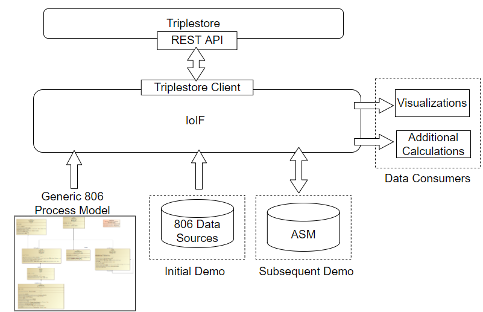
Triplestores are the database technology used to store and work with RDF triples. They provide the infrastructure for semantic web applications by offering persistent storage, query capabilities, and reasoning support. In the context of the Armaments Interoperability and Integration Framework (IoIF), triplestores serve as the central repository for ontology-aligned linked data that enables cross-domain model integration and interoperability.
Key characteristics of triplestores include: - Storage of RDF triples (subject-predicate-object) - Support for SPARQL query language - Reasoning capabilities through defined reasoning profiles - Organization of data into repositories (isolated storage units) - Support for named graphs (optional) - RESTful API for programmatic access
| Triplestores are distinct from traditional relational databases and graph databases, though some triplestores may support graph database features. They specifically focus on the triple structure (subject-predicate-object) and semantic reasoning. |
Position in Knowledge Hierarchy
Broader concepts: - IoIF (part-of)
Details
Structure and Organization
Triplestores organize data into repositories, which correspond to specific endpoints for querying. Each repository has its own configuration, including:
Configuration Element |
Description |
Repository Name |
Must be URL-compatible (no spaces, symbols, etc.) |
Reasoning Profile |
Subset of OWL logic used for query inference (e.g., RDFS for taxonomical reasoning) |
Named Graphs |
Optional subdivision of data within a repository for querying |
The reasoning profile is particularly important as it determines what subset of OWL’s logic will be used to inform query results. While some triplestores allow changing this profile, others make it immutable.
| The choice of reasoning profile impacts both query results and performance. More expressive profiles (e.g., OWL-DL) allow for more complex inferences but require more computational resources and may increase query runtime. |
Repository Creation Process
Creating a repository in a triplestore typically involves these steps:
| Most triplestores provide reasonable defaults and accept pre-made configuration files. Consult the triplestore’s documentation if not using default configurations. |
Step |
Description |
1. Initiate |
Access the databases tab in the triplestore workbench environment |
2. Name |
Provide a URL-compatible name (e.g., "catapult-data") |
3. Configure |
Set repository properties including reasoning profile |
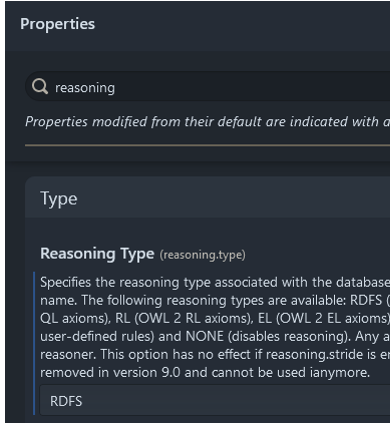
The reasoning profile is configured during repository creation and typically cannot be changed afterward. As noted in the context, IoIF is designed to operate with a minimalist RDFS reasoning profile (taxonomical sub-class, sub-property reasoning) as shown in Figure 104.
| The reasoning profile selection is critical for performance and functionality. Using an overly expressive profile can significantly increase query runtime and computational overhead. |
Data Loading and Querying
Data is loaded into triplestores using API calls to provide RDF documents directly to a target repository. Key considerations include:
| Many repositories require an ontology to be loaded before or at the same time as triples to properly determine property types (e.g., object vs. data vs. annotation). Without an ontology, triplestores will default to assuming all properties are annotations, making data query-able only as plaintext rather than as a triple graph. |
SPARQL is the standard query language for triplestores. A basic SPARQL query might look like:
SELECT DISTINCT ?predicate
WHERE { ?subject ?predicate ?object }
ORDER BY ?predicate
SPARQL supports five main operations: - SELECT: Retrieve data based on a query pattern - ASK: Answer a true/false question based on data in the repository - CONSTRUCT: Return RDF triples built from a provided form and query pattern - INSERT: Add new triples to the repository based on a provided form and query pattern - DELETE: Remove triples from the repository based on a provided form and query pattern
| While SPARQL is powerful, inefficient queries can significantly impact performance, especially with large datasets. It’s recommended to test queries in a workbench environment before integrating them into workflows. |
Triplestore Workbench Environments
Most triplestores provide a workbench environment accessible via a browser or desktop client. This environment typically includes:
-
Repository management tools
-
Query editor with SPARQL support
-
Tools to help optimize query performance
-
Features to automatically generate SPARQL PREFIX statements
| The workbench environment varies between triplestore implementations but generally provides a GUI overlay on the triplestore for repository management. |
Figure 68 (from the context) shows the Stardog Triplestore Environment, which is a common workbench for triplestore management.
Practical applications and examples
IoIF Implementation
In the IoIF framework, triplestores serve as the central repository for ontology-aligned linked data. The IoIF workflow involves:
-
Creating a repository with an appropriate reasoning profile (typically RDFS for taxonomical reasoning)
-
Loading ontologies (e.g., BFO, CCO) and application-specific ontologies
-
Using SPARQL to query and manipulate data as part of the workflow
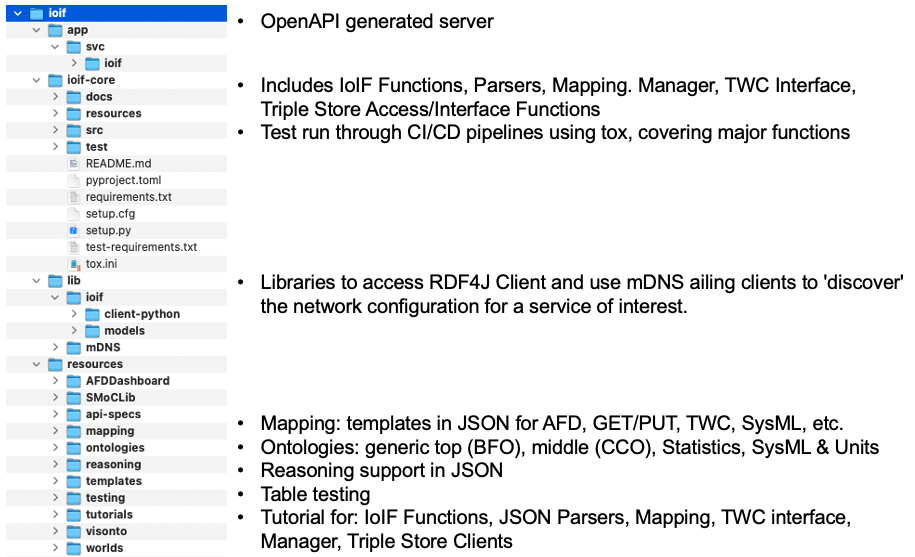
| The IoIF Core structure (shown in Figure 70) demonstrates how the triplestore is integrated into the framework. The IoIF Core loads ontologies into the triplestore at startup. |
Example: Setting Up a Stardog Repository
Here’s a step-by-step guide for setting up a repository in Stardog:
-
Launch the Stardog Workbench (typically accessible at http://localhost:5820)
-
Log in to the Stardog Workbench
-
Navigate to the "Databases" tab
-
Click "New Database"
-
Enter a URL-compatible name (e.g., "catapult-repo")
-
Select the reasoning profile (e.g., "RDFS")
-
Click "Create Database"
-
Once created, click on the repository name to open its management page
-
Load the required ontologies (BFO, CCO, and application-specific ontologies)
| The Stardog Workbench environment shown in Figure 68 provides a visual interface for these steps. |
Example: SPARQL Query in IoIF Workflow
A typical SPARQL query used in the IoIF workflow might look like:
PREFIX bfo: <http://purl.obolibrary.org/obo/BFO_>
PREFIX ioif: <https://gitlab.serc.stevens.edu/rt168/art002/resources/ontologies/ioif.owl#>

SELECT ?catapult ?length
WHERE {
  ?catapult a ioif:Catapult .
  ?catapult ioif:hasArmLength ?length .
}
This query retrieves all catapults and their arm lengths from the triplestore. The use of prefixes (PREFIX) is a common practice to simplify the query by abbreviating long IRIs.
Related wiki pages
References
Knowledge Graph
Associated Diagrams