Introduction
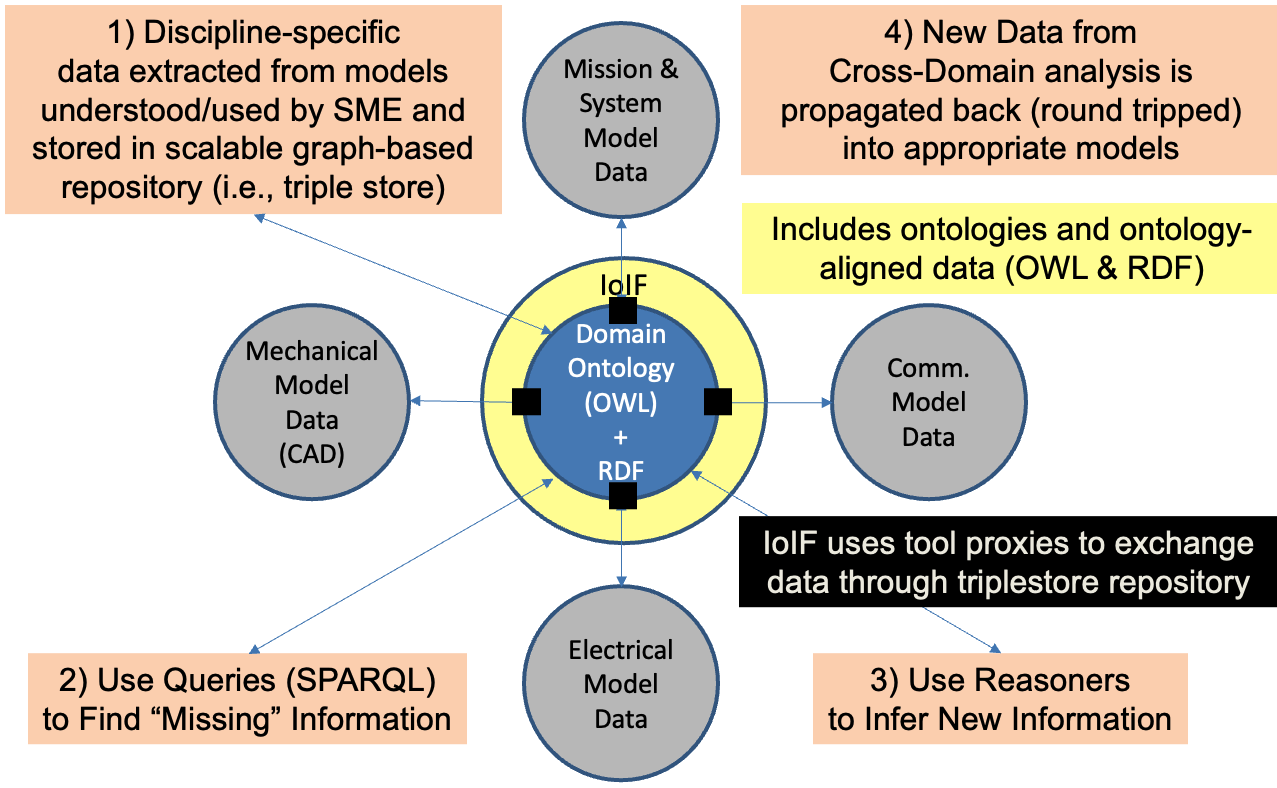
IoIF (Interoperability and Integration Framework) is a technical framework that enables seamless data exchange and integration across different engineering domains and modeling tools using semantic web technologies. It acts as a "translator" that connects various system models, simulations, and data sources into a unified, ontology-aligned data environment.
| IoIF is the practical implementation of the Digital Engineering Framework for Integration and Interoperability (DEFII), specifically designed to enable cross-domain model integration and interoperability in digital engineering. |
Overview
IoIF is a framework that coordinates data exchanges across different modeling tools and domains by leveraging computationally enabled ontologies. It serves as a middleware layer that connects various engineering tools through a triplestore repository, enabling semantic interoperability and data integration. The framework is designed to support digital engineering workflows where multiple models from different disciplines need to be integrated and analyzed together.
IoIF is instantiated for specific projects (referred to as IoIF Applications) with specific objectives. It requires several key elements to function:
Element |
Description |
IoIF Core |
Minimal framework with no domain ontologies |
SysML Models |
Including Mission and System of Analysis (MSoA) model |
Ontologies |
Domain-specific ontologies for the MSoA and SoA |
Workflow |
Coordinates data exchanges with simulations or visualizations |
Triplestore Repositories |
Hold ontology-aligned linked data |
IoIF Service |
Optional component for distributed execution |
The IoIF framework enables the Digital Thread concept by allowing data to flow between different models and analyses, with changes propagated back to the original models.
| IoIF is not a single tool but a framework that uses various technologies including Protégé, triplestores, and Python/Jupyter Notebooks to implement the integration. |
| IoIF requires careful ontology design and alignment with domain-specific models. Poorly designed ontologies will lead to ineffective integration and interoperability. |
Position in Knowledge Hierarchy
Broader concepts: - Part II (is-a)
Narrower concepts: - Workflow (part-of) - Triplestore (part-of)
Details
Core Components
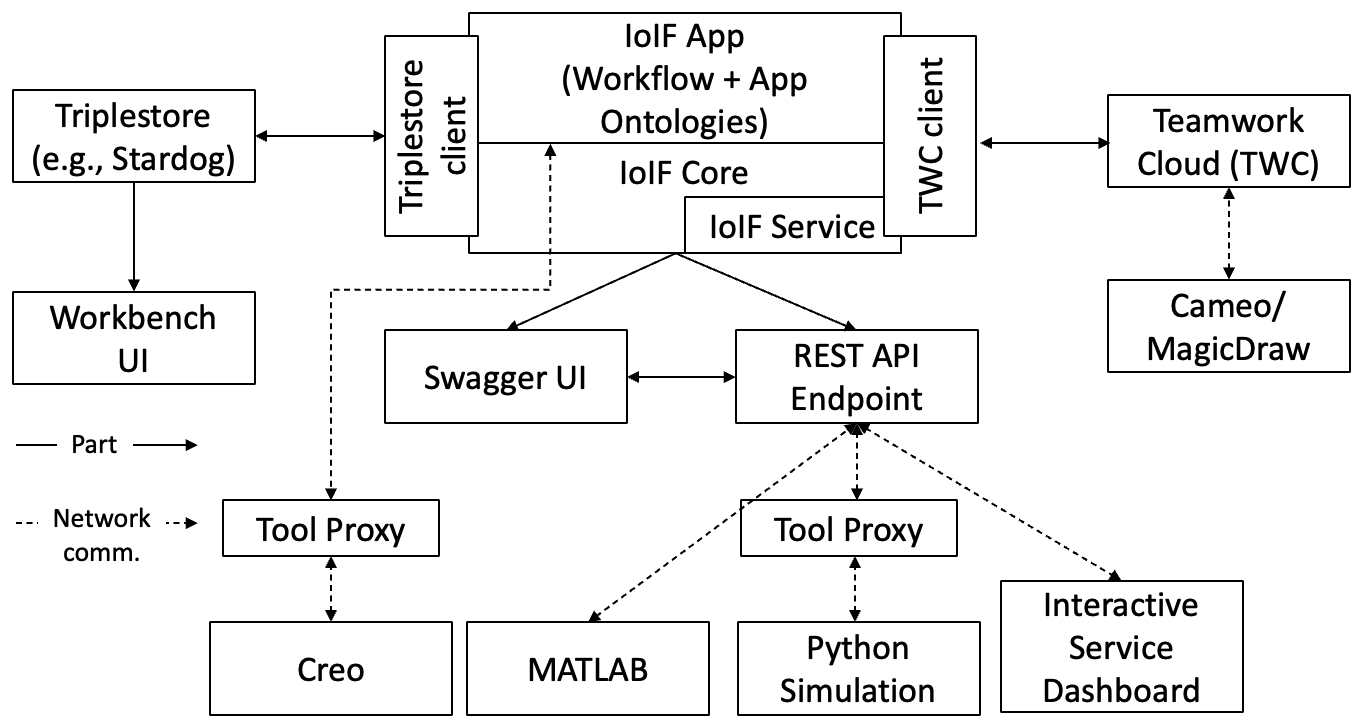
IoIF consists of several key components that work together to enable interoperability:
-
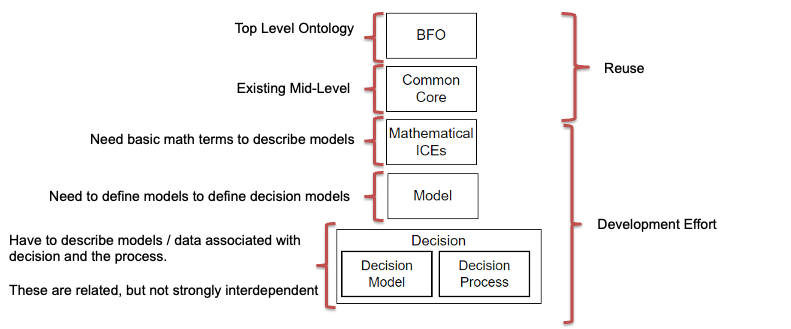
IoIF Core: The minimal framework that provides the foundational structure for the IoIF application. It includes generic ontologies like Basic Formal Ontology (BFO) and the Decision ontology.
-
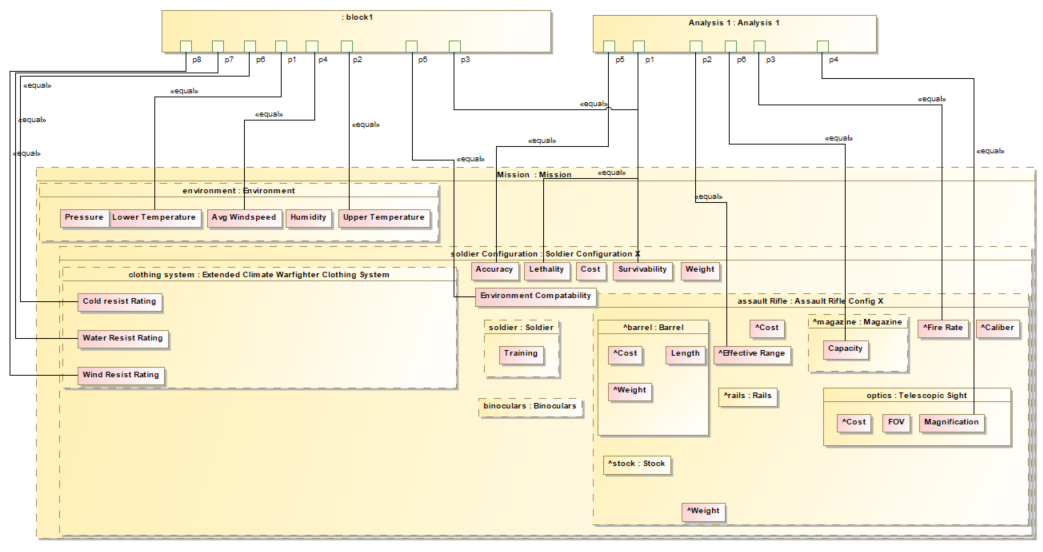
SysML Models: Typically includes a Mission and System of Analysis (MSoA) model that wraps the System of Analysis (SoA) model. The SoA is the system of interest being analyzed.
-
Ontologies: Domain-specific ontologies that map model elements to ontology classes. These are loaded into IoIF during initialization.
-
Workflow: Coordinates data exchanges with simulations or visualizations, often running in a Jupyter Notebook or Python script.
-
Triplestore Repositories: Persistent data stores that hold ontology-aligned linked data. Common triplestore implementations include Stardog and GraphDB.
-
IoIF Service: An optional component that coordinates distributed execution of workflow elements via service-based interfaces rather than file-based exchanges.
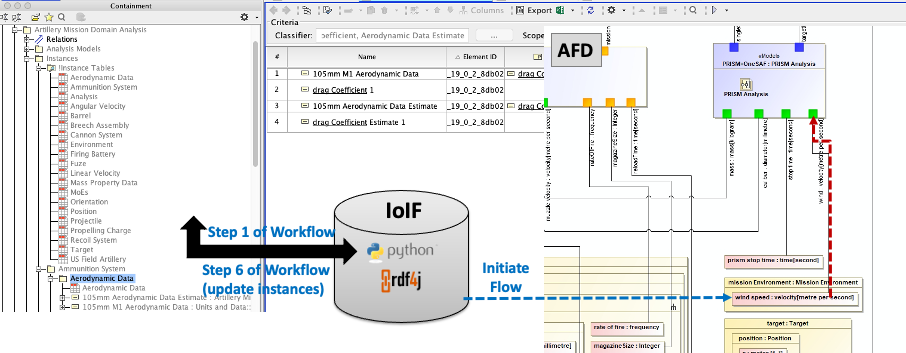
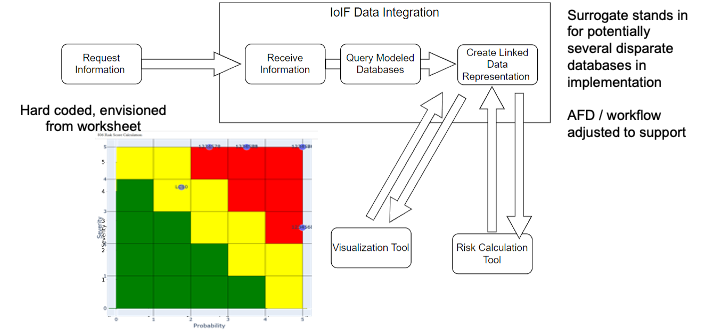
| The IoIF workflow is configured using an Assessment Flow Diagram (AFD) represented in SysML. The AFD specifies the sequence of analyses and data flows between different modeling tools. |
IoIF Workflow Process
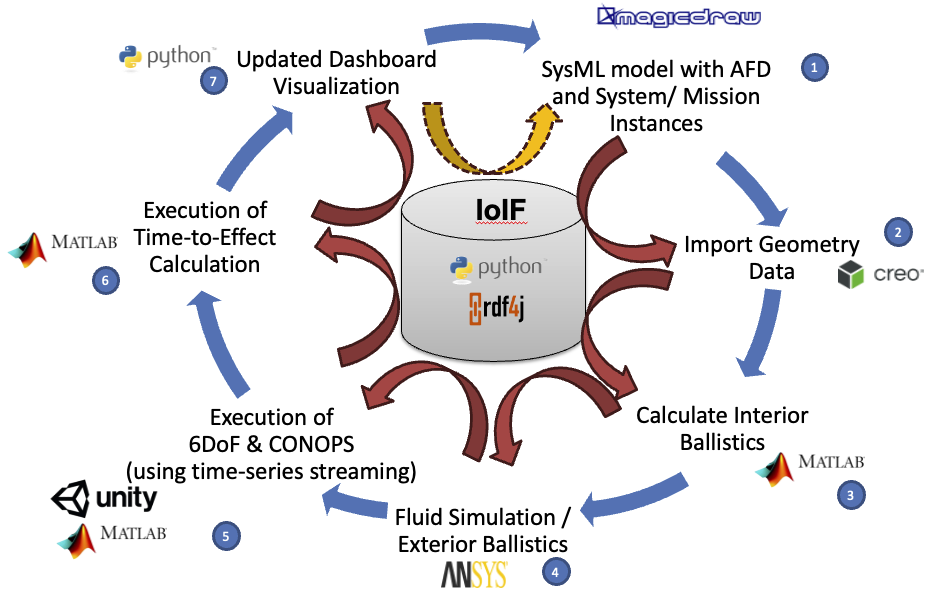
The IoIF workflow follows a structured process for data exchange and analysis:
-
Initialization: The workflow is initialized with a REST GET from the Teamwork Cloud (TWC), loading the SysML model with the AFD.
-
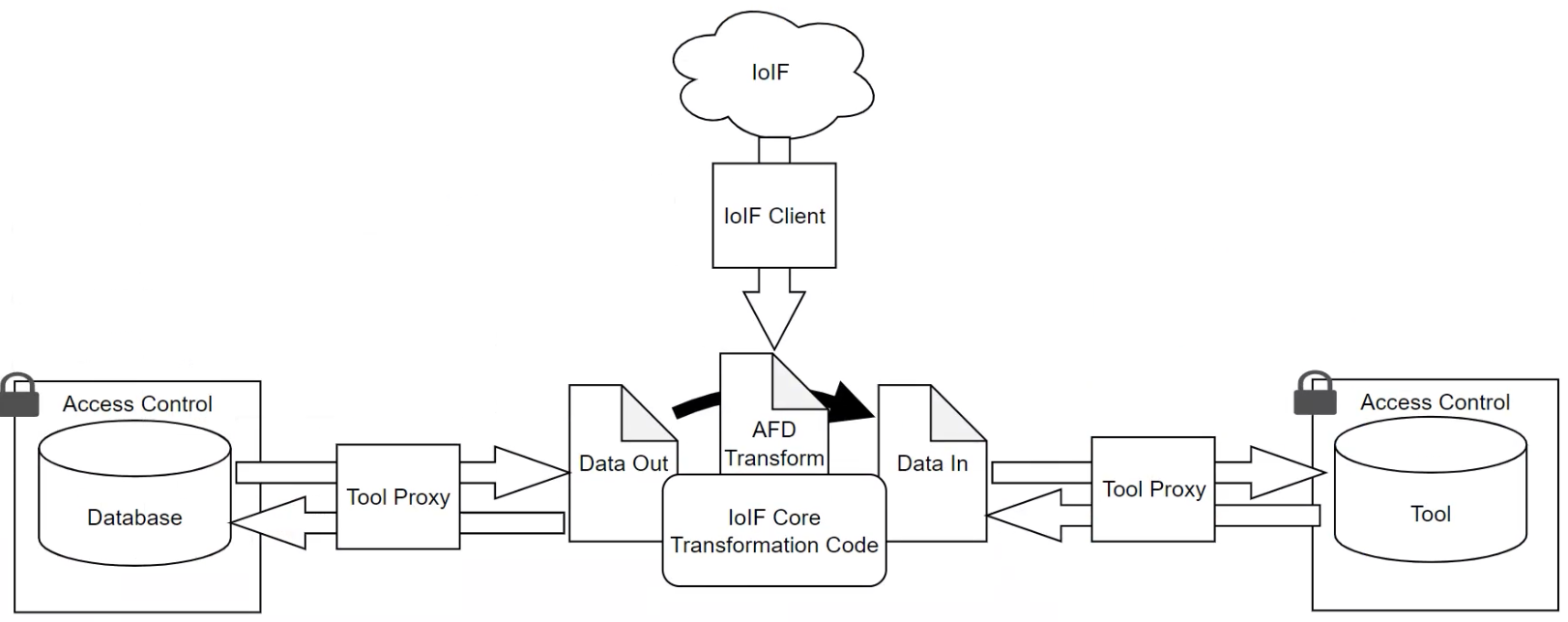
Data Extraction: The workflow pulls data from various tools (e.g., Creo, MATLAB) using tool proxies.
-
Analysis Execution: The workflow runs simulations or analyses using the extracted data.
-
Data Storage: Results are pushed back to the triplestore repository using a REST PUT.
-
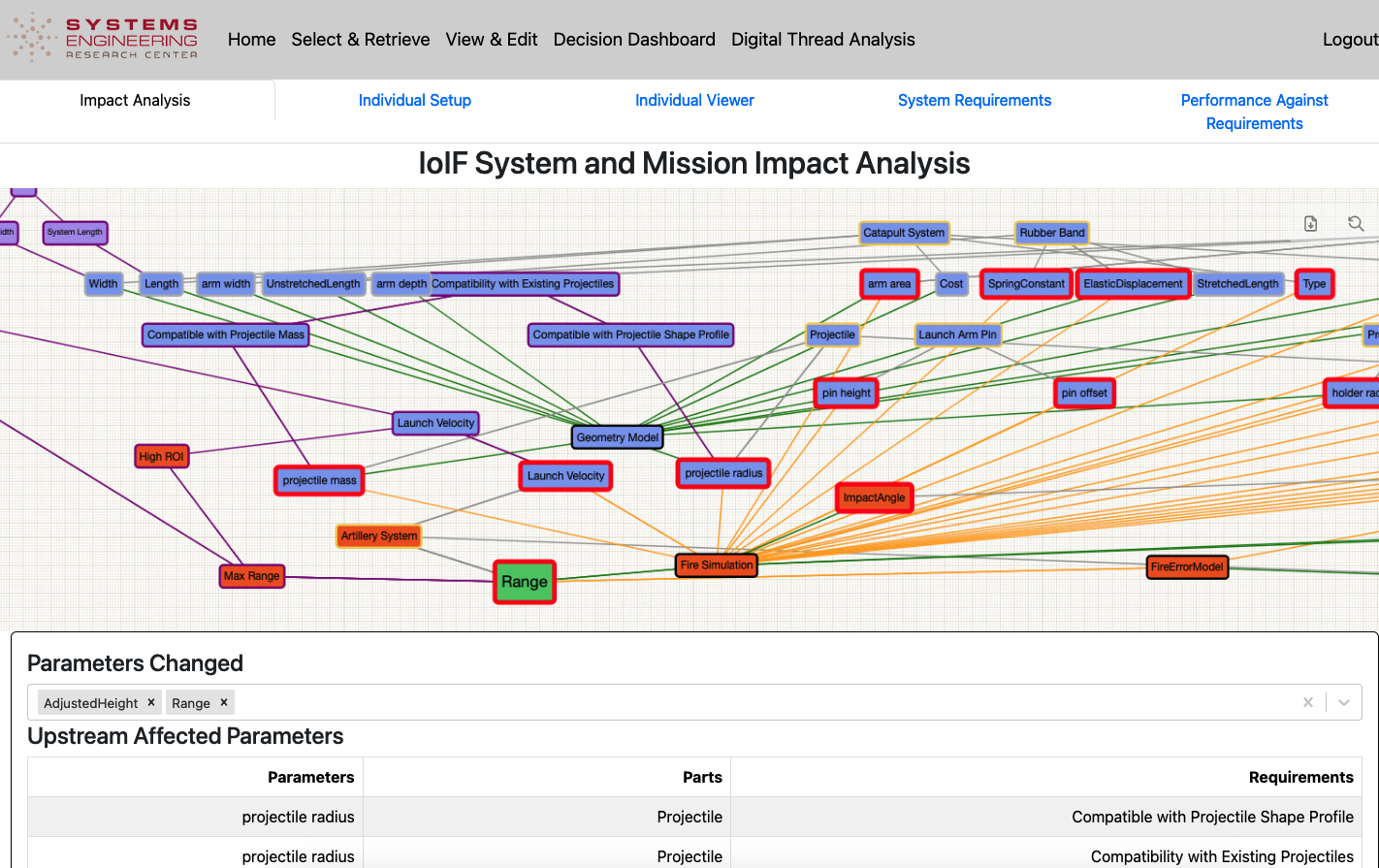
Visualization: Data in the triplestore is rendered in dashboards (Decision Dashboard and Digital Thread Impact Analysis Dashboard).
Tool Proxy Interface Types
IoIF supports three categories of interfaces for data exchange:
Interface Type |
Description |
Direct Interface |
Uses direct invocation of Semantic Web Technology stack (e.g., SPARQL queries) |
Mapping Interface |
Maps data from tool-specific representations to ontology-aligned data |
Specified Model Interface |
Exposes ontology-aligned data in standard formats (CSV, JSON) for external tools |
The Specified Model Interface is particularly important as it enables external tools to interact with the ontology-aligned data without needing to understand the underlying ontologies.
|
When implementing a new tool proxy, start with the Mapping Interface for domain-specific tools, and use the Specified Model Interface for tools that need to interact with the ontology-aligned data without understanding the ontologies. |
Practical applications and examples
Catapult Use Case
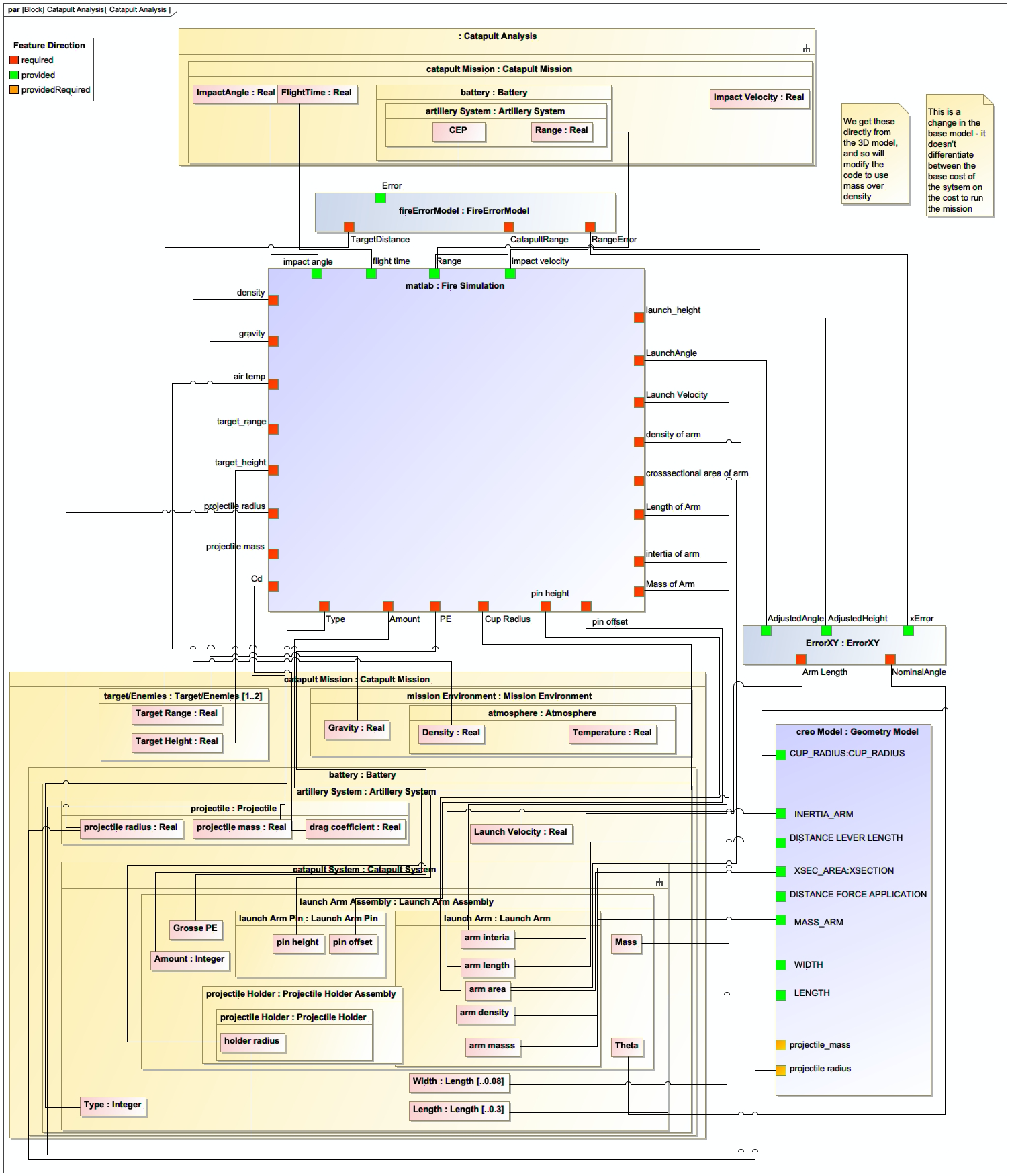
The Catapult use case demonstrates IoIF in action, showing how it integrates different models and analyses for a simple projectile-launching system. The workflow includes:
-
Analysis Types: Four variants were defined (Analysis as Designed, Analysis as Manufactured, Analysis Configuration Changed, Analysis Requirement Changed).
-
Data Exchange: The workflow pulls geometry data from Creo (via CSV), runs ballistic simulations in MATLAB, and integrates results into the triplestore.
-
Visualization: Results are visualized in Decision and Digital Thread dashboards.
| The Catapult example demonstrates how IoIF enables a "Digital Thread" that tracks how changes in one model (e.g., geometry) affect other models (e.g., ballistic performance). |
| In the Catapult example, Creo did not have a programmatic API, so a CSV file was used as an interface rather than a data store. This highlights the need for tool proxies when dealing with tools that lack direct API access. |
Workflow Implementation Example
Here’s a simplified Python implementation of an IoIF workflow that demonstrates data exchange with a tool proxy:
= Initialize IoIF Core
from ioif import IoIFCore
ioif = IoIFCore(ontology="catapult_ontology.owl", triplestore="stardog")

= Load SysML model with AFD
ioif.load_model("catapult_model.twc")

= Pull data from triplestore for analysis
geometry_data = ioif.get_data("geometry", analysis_type="as_designed")

= Run simulation (example using a Python-based ballistic model)
from ballistic_sim import simulate_ballistics
results = simulate_ballistics(geometry_data)

= Push results back to triplestore
ioif.put_data("ballistics_results", results, analysis_type="as_designed")

= Generate visualization
ioif.visualize("decision_dashboard", analysis_type="as_designed")|
For real-world implementations, use Jupyter Notebooks to break down the workflow into discrete, executable cells. This allows different SMEs to work on different parts of the workflow without needing to understand the entire codebase. |
Related wiki pages
References
Protégé Ontology Editor
SysML v2 Documentation
Basic Formal Ontology (BFO)
Shapes Constraint Language (SHACL)
RDF Concepts
SPARQL Query Language
OWL 2 Web Ontology Language
Jupyter Notebook
Stardog Triplestore
GraphDB Triplestore
IoIF Research Paper: Driving Digital Engineering Integration and Interoperability Through Semantic Integration of Models with Ontologies
Knowledge Graph
Visualize the relationships between IoIF and related concepts
Associated Diagrams