Introduction
RDF is a standard way to represent information as simple subject-predicate-object triples, forming the foundation for machine-readable knowledge representation on the Semantic Web.
|
Think of RDF as the basic building block for describing relationships between things in a way that computers can understand and process. |
Overview
Resource Description Framework (RDF) is a foundational technology for the Semantic Web that provides a standard method for representing information as triples (subject-predicate-object). It serves as the basic syntax for many Semantic Web Technologies (SWT), including RDF Schema (RDFS) and Web Ontology Language (OWL).
RDF enables the representation of information as a directed graph, where nodes represent entities and edges represent relationships between them. This graph-based representation allows for flexible and expressive knowledge representation that can be queried, reasoned about, and integrated across different systems.
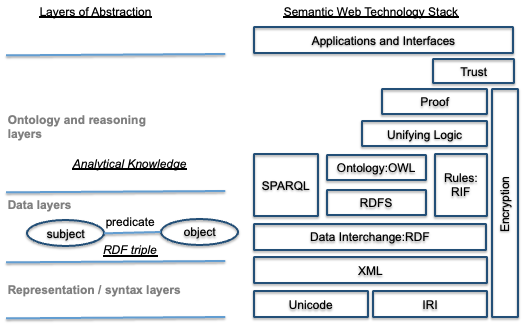
RDF is the backbone of the Semantic Web stack, providing the basic structure upon which more expressive languages like RDFS and OWL build. As shown in Figure 23 of the context, RDF is the lowest layer of the Semantic Web technology stack.
|
RDF is not a database, but rather a data model and format for representing information as a graph of interconnected resources. |
Position in Knowledge Hierarchy
Broader concepts: - Ontology (is-a)
Details
RDF Triples and Graphs
RDF represents information as triples, where each triple consists of: - Subject: The entity being described - Predicate: The relationship or property being described - Object: The value or target of the relationship
These triples form a directed graph where: - Nodes represent subjects and objects - Edges represent predicates - The direction of the edge represents the relationship
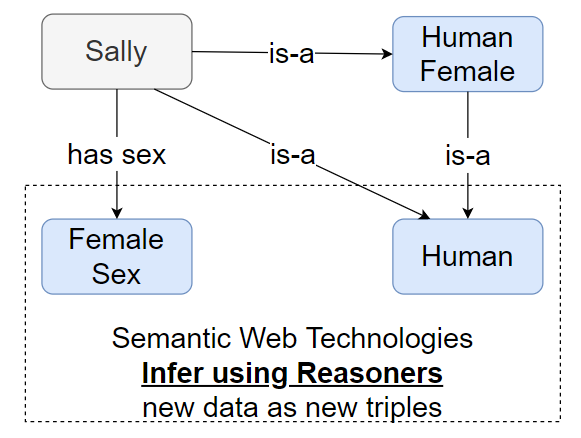
For example, the statement "Sally is a Human" can be represented as: - Subject: Sally - Predicate: is-a - Object: Human
|
RDF triples can represent both specific instances (like "Sally is a Human") and general relationships (like "Human is-a Animal"). |
Internationalized Resource Identifiers (IRIs)
Every node in an RDF graph has a unique identifier called an Internationalized Resource Identifier (IRI), which serves as a globally unique identifier for the resource.
IRIs are similar to URLs but allow for a wider range of characters to support multi-lingual web addresses. They are used to uniquely identify entities in the graph.
RDF Syntax Formats
RDF can be serialized in multiple syntax formats, including: - Turtle (Terse RDF Triple Language) - RDF/XML - N-Triples - JSON-LD
Turtle is a human-readable format that’s commonly used for ontology development and example data. Here’s an example of the "Sally is a Human" statement in Turtle:
@prefix : <http://example.org/> .
:Person_Sally a :Human .
RDF Graph Representation
RDF graphs can be visualized as directed graphs where: - Nodes represent resources (subjects and objects) - Edges represent relationships (predicates) - The graph can be traversed to find related information
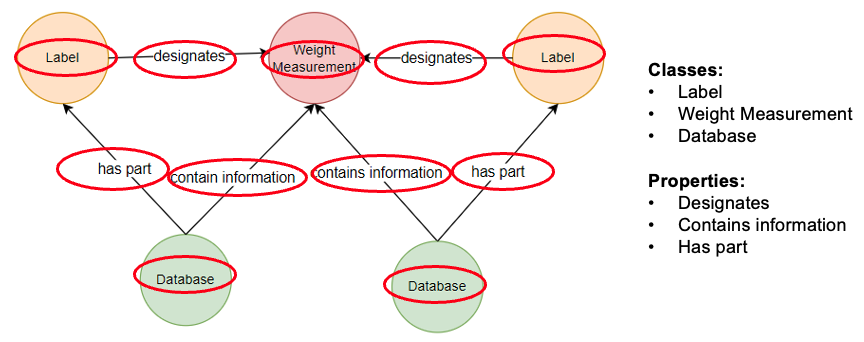
Figure 24 from the context shows how "Everything is Represented as Linked Data as: Subject - Predicate - Object."
|
RDF graphs are inherently flexible and can be extended with additional triples without requiring schema changes, making them ideal for representing evolving knowledge domains. |
Practical applications and examples
RDF in the DEFII Framework
The Digital Engineering Framework for Integration and Interoperability (DEFII) uses RDF as the foundation for ontology-aligned data. As described in the context, RDF provides the basic structure for representing information in a way that can be queried and reasoned about.
In the IoIF (Armaments Interoperability and Integration Framework) workflow, RDF triples are stored in triplestore repositories, enabling: - Data integration across different engineering tools - Automated reasoning about relationships between entities - Querying of data using SPARQL
Working with RDF in Python
Python has several libraries for working with RDF, including rdflib, which is commonly used in Semantic Web applications.
Here’s a simple example demonstrating how to create an RDF graph using Python and rdflib:
from rdflib import Graph, URIRef, Namespace, RDF, Literal

= Create a new RDF graph
g = Graph()

= Define a namespace (using a common prefix)
EX = Namespace("http://example.org/")

= Add triples to the graph
g.add((EX.Sally, RDF.type, EX.Human))
g.add((EX.Sally, EX.hasGender, Literal("Female")))
g.add((EX.Human, RDF.type, EX.Class))

= Serialize the graph to Turtle format
print(g.serialize(format="turtle").decode("utf-8"))
This code creates a simple RDF graph representing that Sally is a Human with a female gender. The output would be a Turtle serialization of the graph.
|
When working with RDF, be careful with the use of IRIs. They must be unique and properly formatted to ensure proper identification of resources across different systems. |
RDF Querying with SPARQL
SPARQL is the query language for RDF data, similar to SQL for relational databases. It allows you to query the RDF graph for specific patterns of information.
Here’s an example SPARQL query to find all humans in the graph:
PREFIX ex: <http://example.org/>
SELECT ?person
WHERE {
  ?person a ex:Human .
}
This query returns all resources that are instances of the Human class.
|
SPARQL queries can be executed against RDF triplestores using various tools, including Python libraries like |
Related wiki pages
References
RDF Knowledge Structure
Visualize the relationship of RDF within the Semantic Web stack
Associated Diagrams