Introduction
A Jupyter Notebook is an interactive, web-based environment that enables the creation and sharing of documents containing live code, equations, visualizations, and narrative text. In the context of the Armaments Interoperability and Integration Framework (IoIF), Jupyter Notebooks provide a transparent, step-by-step workflow execution environment for digital engineering tasks.
Overview
Jupyter Notebooks serve as the primary execution environment for IoIF workflows, offering several key advantages:
-
Transparency: Each step of the workflow is documented and visible in the notebook
-
Interactivity: Users can execute code cells individually and see immediate results
-
Reproducibility: Complete workflow documentation is preserved in the notebook
-
Integration: Seamlessly connects with other tools via REST APIs and triplestores
-
Documentation: Markdown cells allow for inline technical documentation
In the IoIF framework, Jupyter Notebooks execute the workflow that integrates data from multiple modeling and simulation tools, enabling cross-domain analysis and visualization.
| Jupyter Notebooks are the recommended execution environment for IoIF workflows, providing the transparency needed for collaboration between systems engineers, domain experts, and decision-makers. |
Position in Knowledge Hierarchy
Broader concepts: - Workflow (is-a)
Details
Jupyter Notebooks consist of a sequence of cells that can contain code, markdown, or raw text. The IoIF workflow in a Jupyter Notebook follows a specific structure:
Cell Type |
Purpose in IoIF Workflow |
Initialization |
Sets up environment variables, imports IoIF Core, configures workflow |
Data Acquisition |
Pulls data from tools (TWC, Creo, etc.) |
Analysis |
Executes simulations or analyses using the data |
Data Persistence |
Stores results in the triplestore |
Visualization |
Generates dashboards or visualizations |
The IoIF workflow uses REST-based data exchange patterns:
- GET requests to retrieve data from the triplestore
- Processing of data
- PUT requests to store results back in the triplestore
| The first cell of an IoIF Jupyter Notebook typically contains setup information including environment variables, file dependencies, and configuration details for the workflow. |
| When running IoIF workflows in Jupyter Notebooks, ensure that the triplestore repository is running before starting the notebook, as the workflow will attempt to connect to it. |
Practical applications and examples
IoIF Workflow Execution
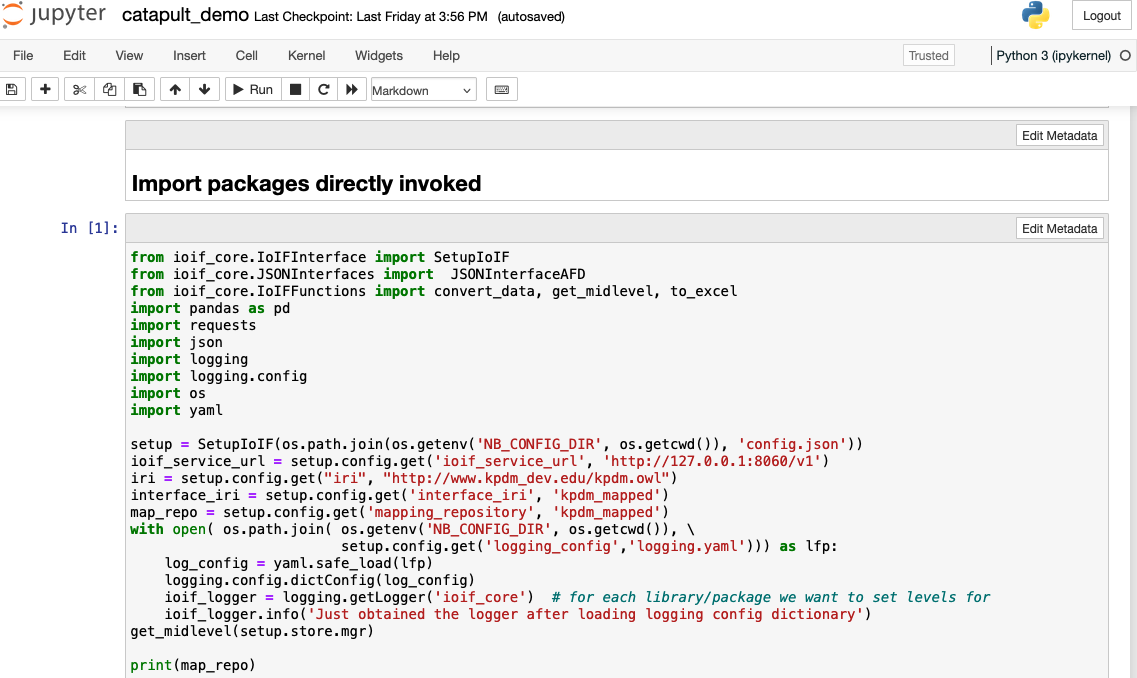
Here’s a typical workflow cell structure for an IoIF application:
= Initialize environment variables
import os
os.environ["IoIF_ontologies"] = "/path/to/ontologies"
os.environ["IOIF_CONFIG_FILE"] = "/path/to/my_defaults.py"

= Import IoIF Core
from ioif_core import IoIF

= Initialize IoIF
ioif = IoIF()

= Set up TWC connection
ioif.setup_twc(
    url="https://twc.example.com",
    username="user",
    password="password"
)

= Pull SysML model from TWC
sysml_model = ioif.pull_sysml_model("Catapult_Model")

= Set analysis type
ioif.set_analysis_type("Analysis as Designed")

= Get data from triplestore
data = ioif.get_data("Catapult_Initial_State")

= Run simulation (example: ballistics)
ballistics_result = run_ballistics_simulation(data)

= Store results back to triplestore
ioif.put_data("Ballistics_Result", ballistics_result)

= Visualize results
plot_results(ballistics_result)| The IoIF App typically includes a requirements.txt file that specifies all necessary Python libraries for the workflow execution. |
Starting the IoIF Workflow
To execute an IoIF workflow using a Jupyter Notebook, follow these steps:
-
Install required dependencies:
`
pip install -r requirements.txt
` -
Start the Jupyter Notebook server:
`
jupyter notebook
` -
Open the appropriate notebook file (e.g., catapult_demo.ipynb)
-
Run the cells in order to execute the workflow
| The IoIF Service can be started separately using: |
python ioif/app/svc/ioif/swagger_server/__main__.py| Do not store sensitive credentials (like TWC passwords) directly in the notebook. Instead, use environment variables or secure credential storage mechanisms. |
Related wiki pages
References
Knowledge Graph
Associated Diagrams