Introduction
Part IV explains how to verify and validate digital engineering models using ontologies, and how to visualize model relationships and impacts. It covers techniques to ensure models are well-formed and consistent, and tools to help engineers understand complex system interactions.
|
Verification ensures models meet requirements, while validation checks if models correctly represent the real-world system they’re meant to describe. This part shows how to automate these processes using ontologies. |
Overview
Part IV details the Semantic System Verification Layer (SSVL), which provides three verification approaches to ensure digital engineering models are well-formed and consistent. It also covers visualization tools that help engineers understand system impacts and trade-offs. Key components include:
-
Semantic System Verification Layer (SSVL): A framework for model verification using three approaches
-
SPARQL: A query language for retrieving ontology-aligned data
-
SHACL: A constraint language for validating ontology data
-
Decision Dashboard: A visualization tool for trade-off analysis
-
Digital Thread Impact Analysis: A tool for understanding system impacts
This part enables engineers to automate model verification and gain insights through intuitive visualizations, improving decision-making throughout the system lifecycle.
|
The verification techniques in Part IV help prevent costly errors in system design by catching inconsistencies early in the development process. |
Position in Knowledge Hierarchy
Broader concepts: - Handbook on Digital Engineering with Ontologies (contains)
Narrower concepts: - SPARQL (is-a) - SHACL (is-a) - SoA (is-a) - SSVL (is-a) - Decision Dashboard (is-a) - Digital Thread Impact Analysis (is-a)
Details
Semantic System Verification Layer (SSVL)
The SSVL provides a comprehensive approach to model verification using three distinct methods:
Verification Approach |
Description |
Tools Used |
Open World Analysis |
Uses Description Logic Reasoning to check consistency under the Open World Assumption (OWA) |
Pellet, HermiT |
Closed World Analysis |
Uses SHACL to enforce constraints and check for missing data under the Closed World Assumption (CWA) |
SHACL, SPARQL |
Graph-Based Analysis |
Uses graph algorithms to verify structural properties like acyclic relationships |
NetworkX, Python |
The SSVL approach ensures models are well-formed by checking both logical consistency (Open World) and structural completeness (Closed World and Graph-Based).
|
The Open World Assumption (OWA) means that anything not explicitly stated is assumed to be unknown, not false. This is important for reasoning about incomplete information in engineering models. |
Verification Approaches in Practice
Let’s examine each verification approach with practical examples:
Open World Analysis (Description Logic Reasoning)
Open World Analysis uses Description Logic (DL) to check model consistency. It works by applying axioms from the ontology to verify that the model adheres to defined constraints.
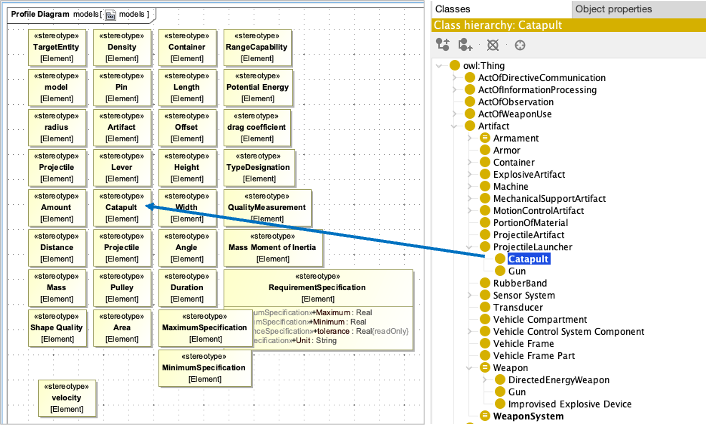
Example: Checking a Catapult Model for Consistency
= Example of using Pellet to verify a Catapult model
from owlready2 import *

= Load the ontology and model
onto = get_ontology("catapult.owl").load()

= Create a reasoner instance
reasoner = Pellet()

= Run the reasoner to check for inconsistencies
reasoner.run(onto)

= Check for inconsistencies
if onto.inconsistent:
    print("Inconsistency found!")
    for error in onto.inconsistent:
        print(f"Error: {error}")
else:
print("Model is consistent!")|
Use the Open World Analysis approach to verify logical consistency of your model, especially for complex relationships between system components. |
Closed World Analysis (SHACL)
Closed World Analysis uses SHACL to enforce constraints and check for missing data. It’s particularly useful for ensuring that all required model elements are present and properly configured.
Example: Validating a Catapult Model with SHACL
= Example of using SHACL to validate a Catapult model
from rdflib import Graph
from rdflib.plugins.sparql import prepareQuery
from shaclex import validate

= Load the ontology and model
g = Graph()
g.parse("catapult_model.ttl", format="turtle")

= Load the SHACL shapes
shapes = Graph()
shapes.parse("catapult_shapes.ttl", format="turtle")

= Validate the model against the shapes
results = validate(g, shacl_graph=shapes, inference="rdfs", abort_on_first=False)

= Check validation results
if results.conforms:
    print("Model validation passed!")
else:
    print("Model validation failed!")
    for result in results:
print(f"Violation: {result}")|
SHACL validation requires careful shape design to cover all possible failure scenarios. Incomplete shapes may miss important validation checks. |
Graph-Based Analysis
Graph-Based Analysis uses graph algorithms to verify structural properties of the model. This is particularly useful for checking relationships like the Directed Acyclic Graph (DAG) property in the System of Analysis (SoA).
Example: Checking for Cycles in a Catapult SoA
= Example of using NetworkX to check for cycles in a SoA
import networkx as nx

= Create a directed graph from the SoA model
G = nx.DiGraph()

= Add nodes and edges from the SoA model
G.add_node("Gravity")
G.add_node("AirTemp")
G.add_edge("Gravity", "FireSimulation")
G.add_edge("AirTemp", "FireSimulation")
G.add_edge("FireSimulation", "ImpactVelocity")
G.add_edge("ImpactVelocity", "PinHeight")
G.add_edge("PinHeight", "ImpactVelocity")  # Intentional cycle for demonstration

= Check for cycles
if nx.is_directed_acyclic_graph(G):
    print("SoA is a valid DAG (no cycles)")
else:
    print("SoA contains a cycle!")
    cycle = nx.find_cycle(G)
print(f"Cycle detected: {cycle}")|
Graph-Based Analysis is particularly valuable for verifying the structure of complex systems where relationships must follow specific patterns (like the SoA requiring a DAG). |
Visualization Tools
Part IV also covers visualization tools that help engineers understand system behavior and impacts:
Decision Dashboard
The Decision Dashboard provides a visual interface for trade-off analysis, allowing engineers to evaluate multiple objectives simultaneously.
|
The Decision Dashboard integrates with the Semantic System Verification Layer to automatically incorporate verification results into the visualization, ensuring that only valid trade-offs are presented to decision-makers. |
Digital Thread Impact Analysis
The Digital Thread Impact Analysis tool helps engineers understand how changes to one part of a system affect other components.
|
The Digital Thread Impact Analysis tool uses the ontology-aligned data to automatically identify relationships between system components, eliminating the need for manual tracing of dependencies. |
Practical applications and examples
Catapult Case Study
The Catapult case study demonstrates how the verification and visualization techniques in Part IV can be applied to a real-world engineering problem.
Verification Approach |
Catapult Example |
Open World Analysis |
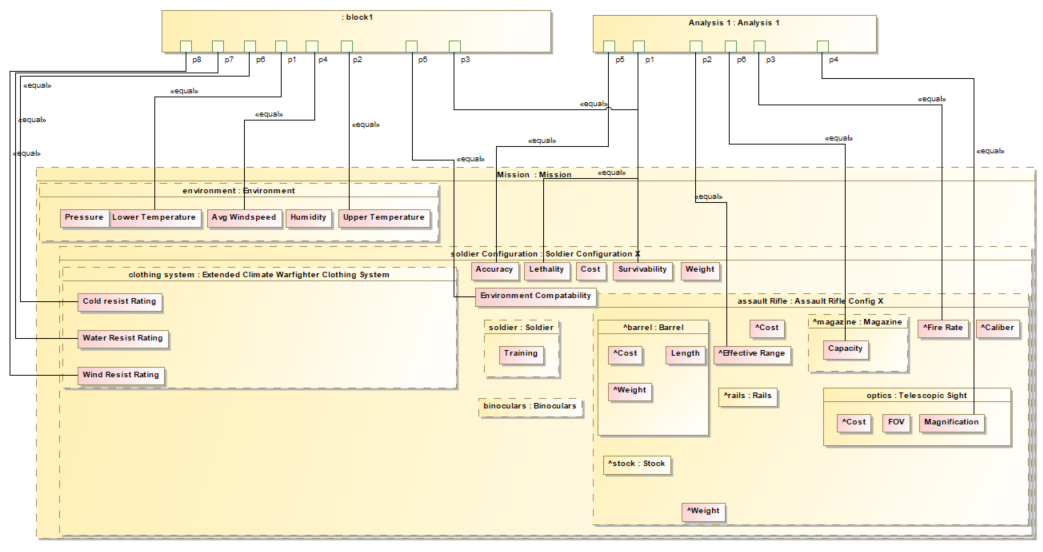
Verifying that all required components (e.g., gravity, air temperature) are properly connected to the fire simulation model |
Closed World Analysis |
Ensuring that all value properties (e.g., Circular Error Probability) are tagged with appropriate ontology terms |
Graph-Based Analysis |
Checking that the System of Analysis (SoA) forms a Directed Acyclic Graph (DAG) to avoid circular dependencies |
Example: Using the Digital Thread Impact Analysis Tool
-
Open the Digital Thread Impact Analysis dashboard
-
Select a parameter of interest (e.g., "Impact Velocity")
-
The dashboard automatically identifies:
-
Upstream parameters (e.g., "Gravity", "Air Temperature")
-
Downstream parameters (e.g., "Pin Height")
-
Unaffected parameters (e.g., "Spring Constant")
-
-
Engineers can then explore how changing upstream parameters affects the selected parameter
|
The Digital Thread Impact Analysis tool requires a well-formed ontology and properly tagged SysML model to function correctly. Poorly structured models may produce inaccurate impact analyses. |
Associated Diagrams